
Download Bedtime Stories Generator – Personalized Storytelling, Free & Secure Tool
Overview
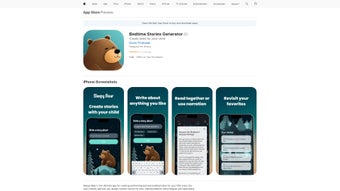
The Bedtime Stories Generator, also known as Sleepy Bear, is an innovative web‑based application designed to craft magical, personalized bedtime stories for children of any age. Parents, teachers, and caregivers can simply enter a few prompts—such as a child’s favorite animal, setting, or hero—and the engine instantly creates a unique narrative that captures imagination while reinforcing reading and listening skills. Because the tool runs entirely in a browser, it is free to download and secure, with no hidden software installations required. The generator also offers a premium tier where users can extend story length, choose custom narration voices, and save stories to a personal library for repeated bedtime enjoyment. By turning storytime into an interactive, customizable experience, Bedtime Stories Generator not only entertains but also nurtures a love for language, encouraging children to ask questions, predict outcomes, and expand vocabulary—all while strengthening the parent‑child bond during those precious nighttime moments.
Key Features, Installation & Compatibility
Feature List
- AI‑driven story generation based on custom prompts (character, setting, theme).
- Multiple story length options—from short 3‑minute tales to extended 15‑minute adventures.
- Voice‑over narration with selectable child‑friendly voices (male, female, whimsical).
- Save & organize favorite stories in a personal cloud library for offline playback.
- Export stories as PDF or audio file for printing or sharing.
- Parental control dashboard to manage content filters and usage limits.
- Educational insights dashboard showing vocabulary complexity and reading level.
- Multi‑language support for English, Spanish, French, and Mandarin.
- Secure, GDPR‑compliant data handling with end‑to‑end encryption.
- Free tier with unlimited story generation; premium subscription unlocks advanced customization.
Installation & Usage Instructions
Because Bedtime Stories Generator is a web application, the installation process is as simple as visiting the official website and clicking the “Start Creating” button. No download of executable files is required, which eliminates the risk of malware and ensures the tool runs on virtually any device with a modern browser. Follow these steps for a smooth start:
- Open your preferred browser (Chrome, Firefox, Safari, Edge) and navigate to the homepage.
- Click “Create Account” to set up a free user profile. You can also sign in with Google or Apple for quick access.
- Once logged in, select “New Story” and fill out the prompt fields—character name, favorite animal, setting, and a brief plot idea.
- Choose a story length and voice option, then hit “Generate.” Within seconds, a personalized story appears on screen, ready to read aloud or download.
- Use the “Save” button to add the story to your library. You can later revisit it, edit details, or export it as a PDF/audio file.
- If you decide to upgrade, click “Go Premium” to unlock longer stories, custom voice packs, and unlimited library storage.
The intuitive interface requires no technical expertise, making it ideal for busy parents and educators who want an instant storytelling solution without a steep learning curve.
Compatibility (Operating Systems)
Bedtime Stories Generator is built on responsive web technology and works seamlessly on Windows 10/11, macOS Monterey and later, Chrome OS, as well as mobile platforms like Android 8.0+ and iOS 13+. Because the application runs in a browser, it automatically adapts to screen size, providing a consistent experience whether you’re on a desktop, tablet, or smartphone. The platform supports all major browsers, including Chrome, Firefox, Safari, and Edge, and requires no additional plugins or extensions.
Pros, Cons & Frequently Asked Questions
Pros
- Instant personalization: Generate unique stories in seconds based on child‑specific interests.
- Zero‑install, secure: Browser‑based access eliminates the need for downloads and protects against viruses.
- Educational value: Enhances vocabulary, listening skills, and creative thinking.
- Flexible voice options: Choose from several child‑friendly narrations to keep bedtime engaging.
- Cross‑platform compatibility: Works on Windows, macOS, Android, and iOS.
- Free tier available: Unlimited basic stories without a subscription.
- Export functionality: Save stories as PDFs or audio files for offline reading.
Cons
- Premium features (longer stories, custom voices) require a monthly subscription.
- Internet connection is required for story generation; offline mode is limited to saved stories.
- Voice options are currently limited to a handful of languages; full multilingual support is planned.
- Advanced content filters may occasionally block creative prompts that are harmless but unconventional.
FAQ
Is Bedtime Stories Generator really free?
Yes, the core story‑generation engine is completely free. You can create unlimited short stories without paying. Premium features such as longer narratives, custom voice packs, and expanded library storage are offered via a subscription.
Do I need to install any software?
No. Bedtime Stories Generator runs entirely in a web browser, so there is nothing to download or install. Simply visit the website, sign in, and start creating stories.
Can I use the app on a mobile device?
Absolutely. The platform is responsive and works on Android phones/tablets (8.0+) and iOS devices (13+). All features, including story generation and voice playback, are available on mobile browsers.
How safe is my child’s data?
The service complies with GDPR and uses end‑to‑end encryption for all stored stories. Personal data is only used to improve the user experience and is never sold to third parties.
Can I export a story to read offline?
Yes. Once a story is generated, you can download it as a PDF for printed reading or as an MP3 file for offline audio playback.
Overall Rating: 4.6/5
Conclusion & Call to Action
The Bedtime Stories Generator delivers a compelling blend of creativity, convenience, and educational value that makes nightly storytime both effortless and enchanting. Its AI‑driven personalization ensures every child feels heard, while the zero‑install, cross‑platform design means parents can access the tool from any device without worrying about security risks. Although the premium tier adds extra depth for power users, the generous free tier already provides more than enough functionality for most families. By turning a routine bedtime ritual into an interactive adventure, the app encourages literacy, imagination, and family bonding—all essential ingredients for a child’s development.
Ready to give your little one a magical night of storytelling? Click here to start creating your first free story and experience the wonder of personalized bedtime narratives today.



.png)



